

Citadel FX Wizard, Wave Bard - Bastl
by Ellison Wolf
As much as we adored the Kastle 2 desktop devices, we were constantly daydreaming about the possibility of both of these being more easily integrated into a Eurorack system. We mentioned it in our review (issue 15), and while I'm under no allusion that it was our words that pushed Bastl's needle into turning these devices into Eurorack modules, I can only imagine how many times they must have heard that sentiment. I'm sure Bastl always knew how great both devices would make as modules, and we must give kudos where and when due, and further, thanks, for giving us both under one faceplate. Yep, you can flip the faceplate, upload the correct firmware, and have either the FX Wizard or Wave Bard for the price of one. That's pretty sweet.
Since we already reviewed the Kastle devices, and most of the features are the same, I won't go over every feature in depth here, but give more of an overall look at each. As for differences, the biggest are that since they're modules, they're powered by your rig (no batteries or USB power needed), and that they use regular patch cables instead of the tiny jumper cables used by the desktop devices. Though this last one might seem like no big deal, it's amazing what the extra space and easier patchability invites in terms of experimentation. Easier to tweak, easier to patch, easier to navigate, and since they're bigger than the devices and there's more space, they're also easier to read.
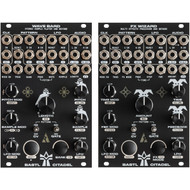
Both modules share a lot of the same attributes: 44kHz/16-bits for stereo processing, a patchable envelope follower, a tempo generator section, and trigger input. They even have the same navigational flow, which is really no surprise. Each also has a Clock section, a CV and gate Pattern generating section, an LFO section (with a triangle and pulse wave) and an Audio section with configurable stereo inputs and outputs where external audio can be mixed at the output. This makes for an ad-hoc mixer as well, and with the addition of a headphone output (what?!), makes the Citadel series a pretty complete package; no surprise for the standalone versions, but somewhat unique in a Eurorack setup for something that's not a traditional monosynth. There's even a MIDI TRS input for incoming data as well as the USB input on the back of the module for in and outgoing MIDI, and for firmware updates and uploading samples and banks. Really, except for a few inputs on the bottom row of jacks that are specific to each module, and the different faceplate graphics (and some text), the two modules are nearly identical in layout, as you'd probably expect. The module sent arrived locked and loaded as the Wave Bard stereo sample player, so that's what I started with.
With thirty-two banks (six are factory loaded) of up to eight samples each, Wave Bard has plenty of power and space for all the field recorded bells and whistles you can throw at it. Sample playback is from 11kHz to 44.1kHz so the size allowed is dependent on the quality, and right off the bat you've got sonic variations from which to start from. There's no screen, so as on the tabletop version, the banks of samples are designated via colors of a light up symbols found in the middle of the module, and are organized via a web app (as are the customizable patterns and scales available), so actually…there is a screen, it's just not attached to the module. It's not very realistic to remember which color is which bank, but if you're a bit methodical and consistent (I always mark green for drums, red for vocals, etc. for tracks in Ableton, Pro Tools, etc., and used that color designation here as well), maybe you'll be fine, and if this doesn't work, a cheat sheet easily fixes this issue. Even so, not remembering exactly what bank/sample is what never stopped me from making incredibly alluring and unexpected and addictive beats, and that's something that Wave Bard does incredibly well. Using the supplied samples, and it's easy to get going; patch in a trigger or press the Play/Shift button, and you're off. Patch some modulation into the Sample to change samples (you can tweak this via the Sample control as well), and then patch CV into the Pitch and Bank CV inputs and watch Wave Bard turn into the most interesting rhythm machine ever. I'm continually surprised how easy it is to get cool and interesting beats, and rhythms out of it. While it's not impossible to be impeccably precise with what you're triggering and sampling, setting up things just how you want them, letting go of convention and you'll be constantly surprised. You can do the same melodically, but as I discovered with the table top version, this thing wants to make beats, and therefore, so why fight it? You can self patch it with the internal LFOs and Pattern outputs, you can tweak the sample Length (which also lets you reverse the sample if the knob is left of center—in the negative voltage range), and tweak it all by hand or put some CV to the task. It's an endless playground for creating beats, and you can get really detailed by making a very full sounding drum track patching in modulation for the Length to sync up with modulation for the Sample so that you get, for example, longer kick hits than snare. The fun goes on and on. And on and on.
The Shift button lets you access secondary functions for each control (like adjusting the tempo for the onboard pattern generator), and there is a Bank button for manual Bank selection, that is also used for some button combos (Bank + knob functions add tertiary functions). These functions aren't written on the faceplate like the Shift + knob functions are, which is a bit of a shame, but too much text can be confusing and crowded, and they are of the lesser used variety, mostly, so it's probably best this way. There are built-in effects (delay, flanger, chorus, and a Lowpass/Highpass filter), which all sound excellent, and these can even be used to color external audio coming from the Input section. The main hands-on/playable controls (Pitch, Sample, Length) have a bird image around them, and this is pretty helpful to denote this; it makes for fast recognition.
Moving on from drum sounds and loading in a bank of vocal samples that I use for testing (mostly background vocals of oohs and aahs), had me interfacing with the web app. It's easy to use, just loading samples into an empty preset slot to get a bank configured, then take the module out of the rack, connect it to the computer and follow the instructions found in the manual (turn off module, attach USB, hold shift + power on module). All that's left is to drag the created file (oh, there's that step!) into the folder and you're ready to go. At it's most basic, you could use Wave Bard as a one-shot triggered sample player synced up to a patch for triggering in specific events of a track/song, and you could even configure a sequencer to trigger specific samples to play at certain times throughout a track's timeline. I love playing with vocal samples, and tweaking the Pitch, Length (and reversing the sample with the same control), and holding Shift+Sample Mod for accessing the added effects (ditto for the filter) was fun and brought about some really interesting sounds and textures. Using the onboard Pattern outputs to do some self-patching created interesting changes, and even more interesting textures when the tempo was accelerated. There are a few switches for changing up the patterns that offer up even more variations.
I find messing with song samples in this way a really rewarding exercise, whether it's with individual stems or mixed snippets. A lot of times, songs/tracks that I've been working on, especially ones where I've become stuck for while, need something—anything—to help me break free, to open up new directions that I might not otherwise think of. Wave Bard excels at this, and it's one of my favorite uses for it. It's the creative songwriting partner who never gets on your nerves.
After spending a few minutes unscrewing the twenty-four jacks and seven knobs with the supplied nut-removal tool, flipping the faceplate around to uncover (release?!) FX Wizard, and then uploading the firmware for it (just a few easy steps here), and the Citadel is magically transformed from a killer sample player into an effects powerhouse. With the same nine effects modes available as on the Kastle 2 tabletop version: delay, shifter, freezer, crusher, slicer, pitcher, flanger, panner, replayer, there's plenty to play with and affect tracks with some effects-driven magic.
Again, as most of the layout is identical (there are rabbits instead of birds for the more playable parameters, and, naturally, some of the inputs and controls are different, due to the dissimilar nature of the modules) the learning curve is friendly. There are a lot of digital multi-effects modules out there, so in that aspect there's no great advantage with FX Wizard as opposed to, say a Disting, which offers many more effects and utilities, or something similar to that. And if I was looking for a fully featured set-and-forget type of delay, panner, or phaser, I would probably (though not necessarily) opt for a more singularly focused module instead of FX Wizard, but that's not really what FX Wizard is going for, and it really lets you dig in and get nasty on some of the modes, changing speed, pitch, etc., to an absurd degree. I enjoyed destroying audio especially with the Freeze, Crusher, and Shifter modes. Whether you're grabbing the rabbit adorned controls or modulating various parameters with CV, it was overly satisfying crushing the soul out of a nice, pretty melodic sequence; it felt powerful, angry. Maybe it was just me as I have been watching way too much news lately, but it was a nice release anyway. Conversely, it was strange how church-y, and wonderfully proper FX Wizard made certain tracks sound using effects like the Delay and Phaser, and it made me appreciate calling the module Citadel, as it is an all-encompassing, fortified sanctuary in and of itself (provided you give it some audio!). There's no end to the amount of tweaking, modulating, or experimenting that you can do with FX Wizard. Whether it's cranking the Feedback, modulating through the effects modes (syncing this to the rhythm of a track was very interesting), getting glitchy by shifting the Time all over the place; I was constantly being enlightened by the sound and movement I was getting. Even more than Wave Bard, using FX Wizard in stereo—depending on modes and settings—was head spinning. Yes, FX Wizard is an effects module, and therefore it does supply effects for coloring a track, but it feels very different than most effects modules out there. Sure, you can patch a signal in, throw some of FX Wizard's delay or whatever on it and get something majestic, but this is a beast designed more as a tool for creating something new out of a supplied audio signal, than merely playing dress up with it. Again, for reworking or pulling tracks out of a ditch, FX Wizard was like baby Superman lifting the truck to fix the flat tire. Impossibly valuable (and timely!).
There are a couple of things to note, and one thing that kept coming up against that I'd love to see. First, is the the ability to set the input volumes separately for the L and R inputs. This would allow for more detailed mixing within the module, and could eliminate the need for external attenuation. Also, there is a lot of color recognition for banks, efx modes, volume levels, etc. Some of it is intuitive (red for volume level is, well…in the red, i.e. too hot), but most of it is not; the colors seem arbitrary. I know this is just how it is since there's no screen, and I can appreciate not having to look at a screen, but I'd be remiss if I didn't bring this up as a potential issue, no matter how obvious it may seem. In that realm, if you're color blind, this aspect for both modules can be problematic. It also might not be, and I don't think it diminishes the exploratory sonic possibilities offered by either one bit.
We've seen dual modules like this before, like with the 4ms Catalyst Sequencer/Controller, and it's a great idea, both in terms of manufacturing efficiency, and creative options for artists and sound designers. It's nice to be able to test drive two modules for the price of one, and switching between the two when the needs arise is handy. Truth be told, however, if you're looking for/could use another effects processor and/or sample player, especially ones that are extremely playable, you're not going to want to switch back and forth, you'll just want them both.
Price: $319