

Enzo X - Meris
by Jason Czyeryk
Is there any letter cooler than "X"? While it's definitely overused when it comes to sports and soda, it's also the straight edge symbol, what marks the spot, and the only single letter I know that is also a band name (a great band, at that). Even die hard Scrabble players know it's the best letter to have on your tile rack.
Those two crossed lines signify something special, and pedal maker Meris knows this, and has used the letter to christen three of their most revered pedals, the Mercury X, LVX, and Enzo X. While reverb and delay pedals can be hoarders' delights, with people having a lot of both on their shelves, Enzo X, being a synth guitar pedal, is more niche, and has less of a community of pedal colleagues. There is, however, no doubt that it lives up to the special expanded "X" treatment, and fits with Meris' other big pedals.
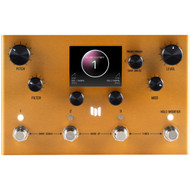
Utilizing the same format and layout as Mercury X and LVX, Enzo X is a pretty orange gold color (there are some special edition colors as well), and easy to spot on any pedal board or shelf. The screen takes center stage here, and while there are two views; Graphic and Text View, I mostly stuck to Graphic as that's how it came loaded, and it works great. Enzo X has four footswitches (and four LED buttons above them, that serve the same purpose), with three to select and scroll presets, while the far left one is a Hold Modifier button and used for tap tempo. Three pushbutton encoders (C1, C2, C3) are your main menu navigation tools, and four knobs (Pitch, Filter, Mod, and Level) are your main parameter controllers. There are ¼" stereo ins and outs, MIDI in and out, a USB-C input for firmware updates, and an assignable and customizable expression pedal input. It's all laid out well in terms of space, and after spending just a minute or so after getting it plugged in, it's surprisingly easy to get going and to navigate around everything, especially impressive with how much is offered up here. Really, like all of Meris' pedals, you can get as deep and tweaky as you'd like, but you could also just go with the presets, as start or end points, and have plenty to explore.
Starting off using a borrowed 335 clone from my nephew that he built, and scrolling through the presets you can quickly get a taste of what's available. For starters, there are five modes, three of which are completely unique to Enzo X (Poly Synth, Mono Synth, Arp Synth) plus two that are taken from Meris' LVX "Poly Chroma” Dry Modes; a mono and a poly pitch shifting mode. Each of these modes can dive deep into their distinct functions per their Edit page, so that with some scrolling and pushing, you can cycle through some graphic bubbles for each parameter to customize any of the modes to your desires. Anything you'd find on a mono or polysynth; filter cutoff, envelope settings, clock settings, modulation, mix, filter type, etc., can all be chosen and sculpted to your liking by using the pushbutton encoders. I won't lie—menu diving and scrolling are two of my most feared actions in life, and when I see a device with a screen, my first feeling is panic. Scars never fully go away, but so much good has come with screens and menus, that my feelings surrounding them are slowly changing for the better. This change is much slower than the progression of menu diving itself, and I'm trying to recall when in recent times that I've been all that stymied or overwhelmed by screens and menus, in the first place. Manufacturers/designers are getting better at navigational tools, and Meris pedals excel here. Once you realize that C1, C2, and C3 are in numerical order, physically on Enzo X, and that C3 is the main control, it couldn't be any easier. Actually, it can, because making things even easier, is that you can "favorite" your two most used parameters for each preset and assign them to C1 and C2 for easy access. That means, that along with the Filter, Mod, Mix, and Pitch knobs, you get six different non-menu necessary controls for each preset, which I found to be plenty for hands-on use.
The four hardwired controls (Pitch, Filter, Mod, and Level) use a different "Tactile" view, which is more reminiscent of studio meter graphics, so it's easy to differentiate where you're at, though this too can be customized so that you can turn it on or off. There is an onboard Modifier section (2 x LFOs, S&H, envelopes, sequencer) each with its own set of customizable parameters, that can be routed all over the place to modulate things hands-free. Especially if you've got a guitar in your hands, the ability to easily modulate pretty much anything and tweak to taste is really powerful and much appreciated.
If you're hoping for effects, well there are four categories of "elements" to add to your sound: Drive, Ambience, Modulate, and Mix. Drive has everything from Tube to Transistor to Bit Crushing, Ambience has your reverbs and echo, Modulate is an extremely configurable modulation center, and Mix is where you can set your mix to taste.
Saving, naming, etc., is all very intuitive and there are 99 slots for presets, with some slots for your own creations. When I was playing through the presets, I found so many different ways, so many caves to explore that I did get lost in the Edit screen dialing everything in. It wasn't a bad thing necessarily, and after a week or so of getting familiar with Enzo X, it got to be really quick to change, edit, customize and save. Walking away from it for a time and coming back to it was pretty painless as well—a pleasant surprise.
As for how it sounds, first, when playing a stringed instrument, Enzo X's mono synth modes are designed for single note playing, while the arp and poly modes are for chords, and while I experimented with trying to fool, beat, or break Enzo X in this way, it didn't prove very fruitful, so the mode you're in, and how you're playing is something to keep in mind.
Enzo X can sound many different ways, and just traveling through the presets, there were more than a few instances where I was swept up (and away), bathed in absolutely gorgeous polysynth chords, beautiful arpeggios, and strong vibrant 70s synth leads. Blown out dirty synth bass? Yes. Some of the beauty that was coming out of my guitar amp was transcendent, and tracking all around was A+.
Along with guitar, I also patched in my modular to utilize Enzo X's enormous cache of sounds and utilities, and sang through the pedal as well, sometimes to excellent effect (monosyth and fuzz bass presets/sounds in particular). As mentioned, Enzo X is MIDI capable, and that opens up a whole other realm of possibilities.
Enzo X is a world unto itself and as far as guitar synth pedals, it's probably your holy grail. It tracks well, the five modes are all great sounding, it's easy to setup, to fine tune, and efficient to navigate, and it can turn your guitar into any number of synths, expanding your sound immensely. While there is a screen you will spend time with, and menu diving is a prerequisite for its operation, it's the myriad of sounds you'll lose yourself in, not the screen.
Price: $599